Part 3: Building Layers with ref() 🏗️
Time: ~10 minutes | Prerequisites: Part 2 completed (bronze pipelines running)
In this part, you will create your first Silver pipeline that joins two Bronze tables
together. You will learn the ref() syntax for declaring dependencies between pipelines
and explore the Lineage page to see your growing DAG.
The Medallion Architecture
RAT uses a three-layer approach to organize your data, commonly known as the medallion architecture:
| Layer | Purpose | Example |
|---|---|---|
| 🥉 Bronze | Raw ingestion — data lands exactly as-is from sources | mission_log, rocket_registry |
| 🥈 Silver | Cleaned, validated, enriched — joins, type casting, dedup | enriched_launches |
| 🥇 Gold | Analytics-ready — aggregations, KPIs, business metrics | launch_summary |
Each layer builds on the one before it. Bronze pipelines read from external sources (landing zones, APIs, files). Silver pipelines read from Bronze tables. Gold pipelines read from Silver tables. This separation keeps your data organized and your pipelines easy to reason about.
You don’t have to follow the medallion naming — RAT supports any layer names.
But bronze, silver, and gold are conventional defaults that most teams use.
Create the Silver Pipeline
Let’s create enriched_launches — a Silver pipeline that joins launch missions with
their vehicle specifications.
Navigate to Pipelines
Open the Portal and go to the Pipelines page. Click New Pipeline.
Configure the pipeline
Set the following fields:
| Field | Value |
|---|---|
| Name | enriched_launches |
| Namespace | default |
| Layer | silver |
| Language | SQL |
Write the SQL
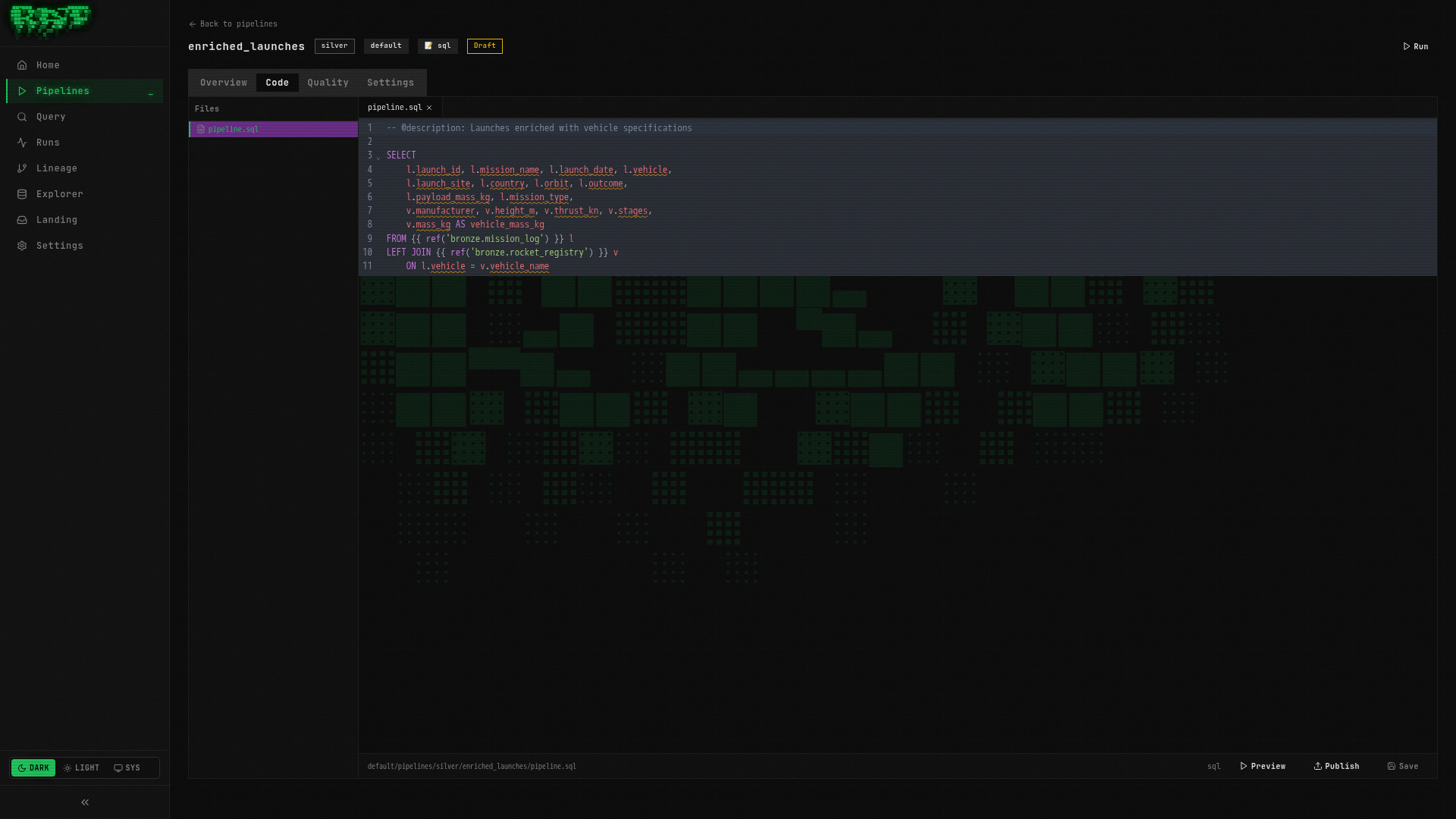
Paste the following query into the editor:
-- @description: Launches enriched with vehicle specifications

SELECT
    l.launch_id,
    l.mission_name,
    l.launch_date,
    l.vehicle,
    l.launch_site,
    l.country,
    l.orbit,
    l.outcome,
    l.payload_mass_kg,
    l.mission_type,
    v.manufacturer,
    v.height_m,
    v.thrust_kn,
    v.stages,
    v.mass_kg AS vehicle_mass_kg
FROM {{ ref('bronze.mission_log') }} l
LEFT JOIN {{ ref('bronze.rocket_registry') }} v
    ON l.vehicle = v.vehicle_name
This query does two things:
- Selects all columns from the
mission_logbronze table (launch data) - LEFT JOINs with
rocket_registryto attach vehicle specs (manufacturer, height, thrust, stages, mass)
The LEFT JOIN ensures we keep all launches even if a vehicle isn’t found in the registry.
Preview the results
Click Preview to run the query without persisting anything. You should see 25 rows —
each launch now enriched with its vehicle’s specifications. Launches using vehicles not
in the registry will have NULL values for the vehicle columns.
Publish the pipeline
Click Publish to save the pipeline definition. The badge will change from Draft to Published.
Run the pipeline
Click Run to execute the pipeline. RAT will:
- Resolve the
ref()calls to find the upstream Bronze tables - Execute the SQL against DuckDB
- Write the results to the Iceberg catalog as
default.silver.enriched_launches
Understanding ref()
The ref() function is how you declare dependencies between pipelines. When RAT sees
{{ ref('bronze.mission_log') }}, it does two things:
- Resolves the table path — replaces the ref with the actual Iceberg table reference
- Registers a dependency — RAT now knows this Silver pipeline depends on that Bronze pipeline
Two-part vs three-part syntax
| Syntax | Example | When to use |
|---|---|---|
2-part layer.name | {{ ref('bronze.mission_log') }} | Same namespace (most common) |
3-part namespace.layer.name | {{ ref('default.bronze.mission_log') }} | Cross-namespace references |
In most cases, the 2-part syntax is what you want. It references a pipeline within the same namespace as the current pipeline. Use 3-part syntax only when you need to read from a different namespace.
If you mistype a ref (e.g., ref('bronze.mision_log') — note the typo), RAT will
catch the error at preview or run time and show you which reference could
not be resolved. Always preview before publishing!
Explore the Lineage DAG
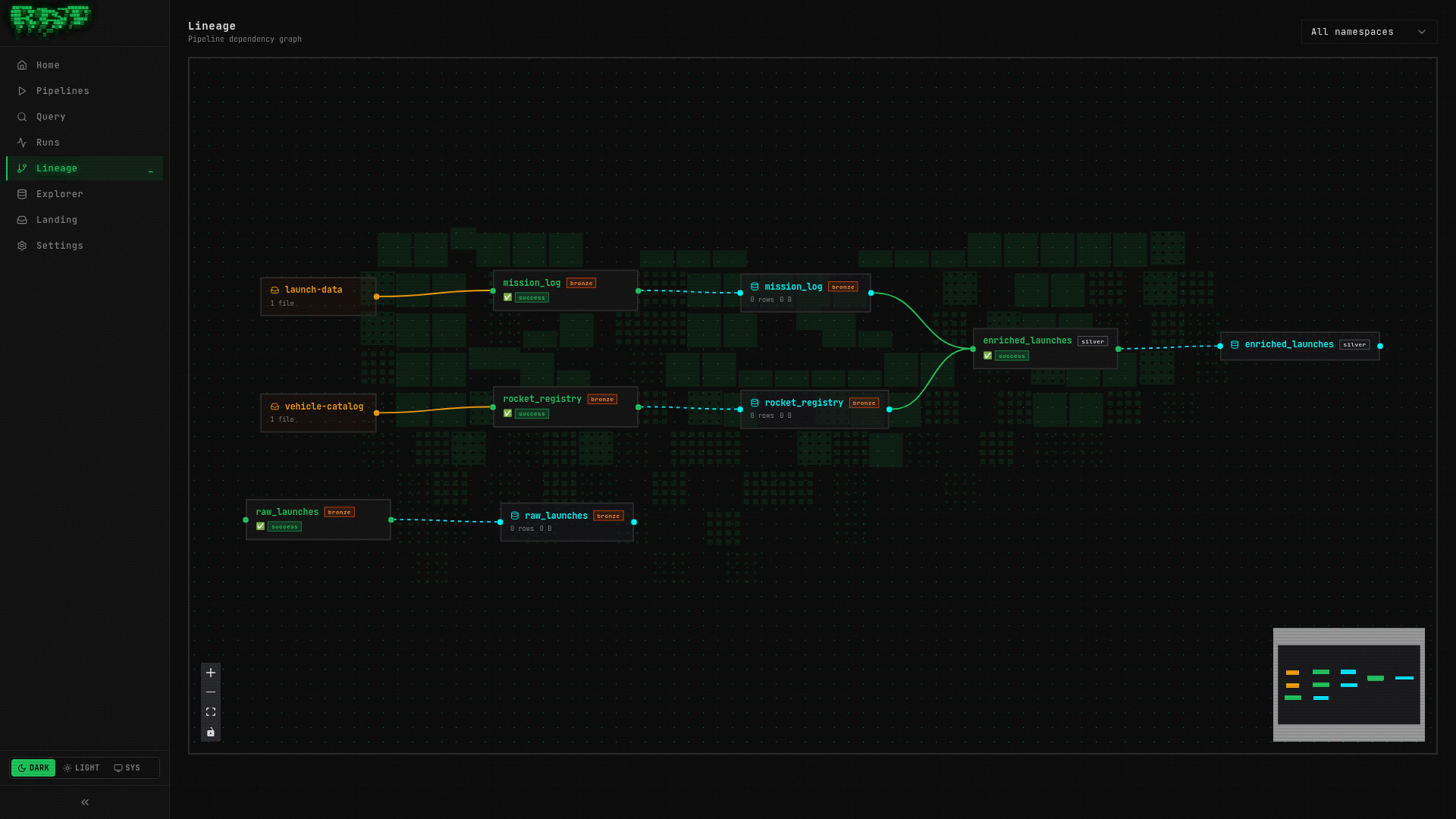
Now that your Silver pipeline references two Bronze pipelines, RAT has built a dependency graph. Let’s see it.
Navigate to the Lineage page
Click Lineage in the sidebar navigation (or go to /lineage directly).
View the DAG
You should see a directed acyclic graph (DAG) with three nodes:
Understand the node colors
Each node in the DAG is color-coded by layer:
| Color | Layer | Meaning |
|---|---|---|
| 🟤 Brown/copper | Bronze | Raw ingestion pipelines |
| ⚪ Silver/gray | Silver | Enriched/cleaned pipelines |
| 🟡 Gold/yellow | Gold | Analytics-ready pipelines |
Clicking any node in the DAG takes you directly to that pipeline’s detail page.
The Lineage page updates automatically as you publish new pipelines with ref() calls.
As your platform grows, this becomes invaluable for understanding data flow and
impact analysis — “if this Bronze source breaks, what downstream pipelines are affected?”
Verify the Data
Let’s confirm the enriched data looks correct.
Open the Query page
Navigate to the Query page in the sidebar.
Run a verification query
SELECT
    mission_name,
    vehicle,
    manufacturer,
    thrust_kn,
    outcome
FROM default.silver.enriched_launches
ORDER BY launch_date DESC
LIMIT 10
You should see recent launches with their vehicle manufacturer and thrust values filled in.
Check for unmatched vehicles
SELECT DISTINCT vehicle
FROM default.silver.enriched_launches
WHERE manufacturer IS NULL
This shows any vehicles in the launch data that don’t have a match in the rocket registry.
A LEFT JOIN keeps these rows (with NULLs) rather than dropping them — that’s usually
what you want in a Silver layer so you don’t silently lose data.
What You Built
In this part, you:
- ✅ Created a Silver pipeline (
enriched_launches) that joins two Bronze tables - ✅ Learned the
ref()syntax for declaring pipeline dependencies - ✅ Explored the Lineage DAG to visualize data flow
- ✅ Verified the enriched data in the Query page
Your pipeline graph now has three nodes across two layers. In the next part, you’ll learn how to make pipelines incremental so they don’t reprocess the entire dataset on every run.
Next: In Part 4, you’ll master merge strategies and make your pipelines load data incrementally.