Part 4: Merge Strategies & Incremental Loading ⚡
Time: ~15 minutes | Prerequisites: Part 3 completed (Silver pipeline running)
So far, every time you run a pipeline, RAT drops the table and recreates it from scratch. That works fine for small datasets, but imagine ingesting millions of rows per day — you don’t want to reprocess everything on every run.
In this part, you’ll learn all 6 merge strategies RAT supports and make your
mission_log pipeline incremental so it only processes new rows.
The 6 Merge Strategies
RAT supports six strategies for how new data is merged into existing tables. Each one fits a different data pattern:
| Strategy | Behavior | Best For |
|---|---|---|
full_refresh | Drop and recreate the entire table | Small/static datasets, lookup tables |
incremental | Append only rows newer than the watermark | Event logs, time-series, append-heavy data |
append_only | Always append, no deduplication | Immutable event streams, audit logs |
delete_insert | Delete rows matching key, then insert new | Dimension updates, upsert patterns |
scd2 | Slowly Changing Dimension Type 2 — track historical changes | Customer records, product catalogs |
snapshot | Full snapshot comparison — diff old vs new | Audit trails, compliance reporting |
The default strategy is full_refresh. If you don’t specify a merge strategy, RAT
will drop and recreate the table on every run. This is the safest default — you opt
into smarter strategies explicitly.
Hands-On: Make mission_log Incremental
Let’s modify the mission_log bronze pipeline from Part 2 to use the incremental
strategy. This way, on subsequent runs, it will only ingest rows with a launch_date
newer than the last processed row.
Open the pipeline editor
Navigate to Pipelines → click on mission_log → go to the Code tab.
Update the SQL
Replace the existing SQL with:
-- @merge_strategy: incremental
-- @unique_key: launch_id
-- @watermark_column: launch_date
-- @description: Space launch mission data from landing zone

SELECT
    launch_id,
    mission_name,
    launch_date,
    vehicle,
    launch_site,
    country,
    orbit,
    outcome,
    payload_mass_kg,
    mission_type
FROM read_csv_auto('{{ landing_zone("launch-data") }}')

{% if is_incremental() and watermark_value %}
WHERE launch_date > '{{ watermark_value }}'
{% endif %}
Understand the annotations
The annotations at the top of the SQL configure the merge behavior:
| Annotation | Value | Purpose |
|---|---|---|
@merge_strategy | incremental | Use the incremental merge strategy |
@unique_key | launch_id | The column that uniquely identifies each row |
@watermark_column | launch_date | The column used to track “how far” we’ve processed |
@description | (text) | Human-readable description shown in the Portal |
Understand the Jinja conditionals
The {% if %} block at the bottom is the magic of incremental loading:
{% if is_incremental() and watermark_value %}
WHERE launch_date > '{{ watermark_value }}'
{% endif %}
Here’s what happens:
- First run:
is_incremental()returnsfalsebecause the table doesn’t exist yet. TheWHEREclause is skipped, and all 25 rows are loaded. - Subsequent runs:
is_incremental()returnstrueandwatermark_valuecontains the maximumlaunch_datefrom the existing table. Only rows newer than that date are processed.
Publish the changes
Click Publish to save the updated pipeline definition.
Run it — first time
Click Run. Since this is the first run with the incremental strategy, RAT loads all 25 rows (the table is being created fresh).
Check the run logs — you should see something like:
Merge strategy: incremental
Watermark value: None (first run)
Rows written: 25
Run it — second time
Click Run again. This time, RAT checks the watermark:
Merge strategy: incremental
Watermark value: 2024-09-15
Rows written: 0 (no new data)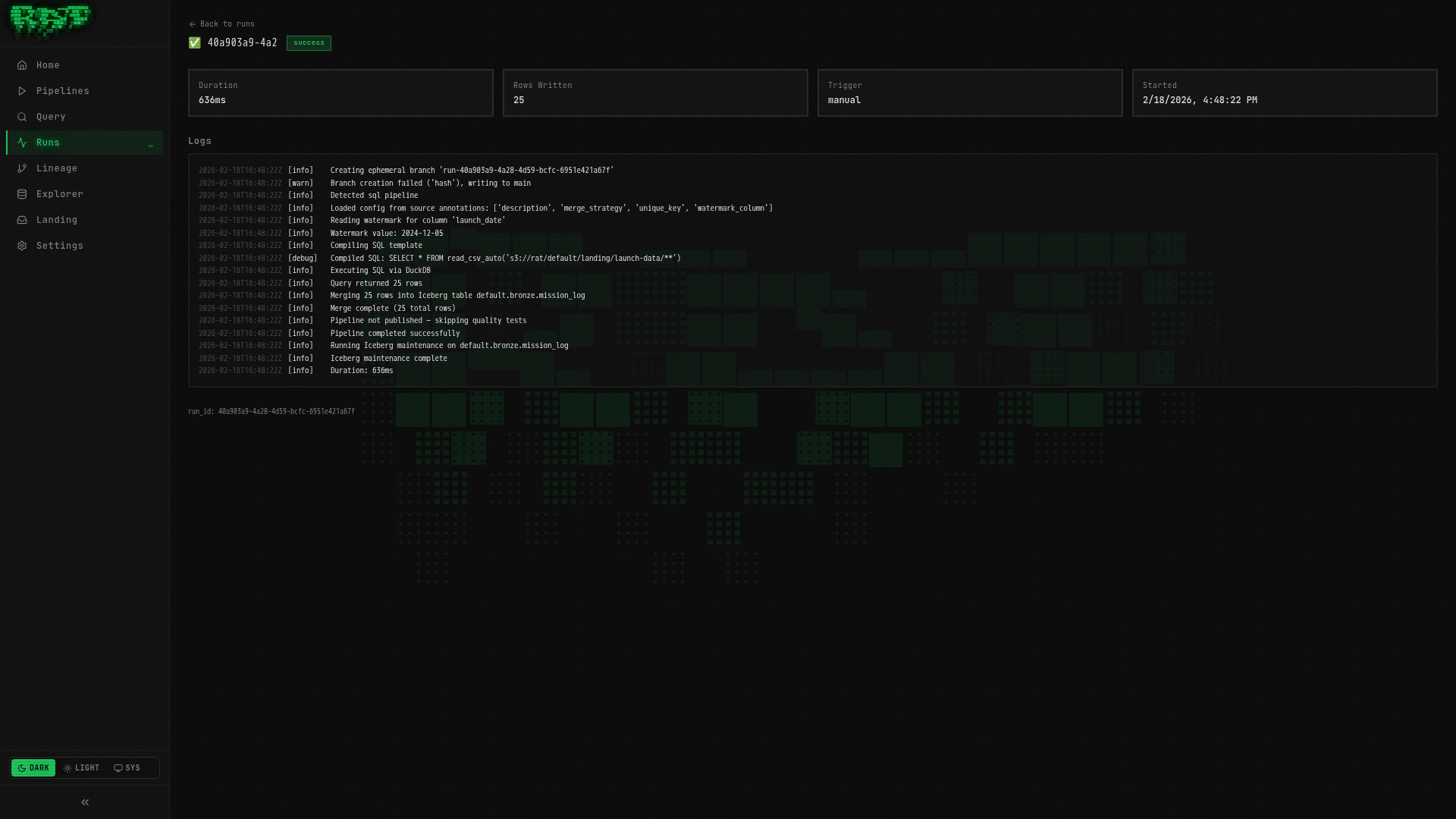
Since no new rows in the CSV have a launch_date after the watermark, zero rows
are processed. This is exactly the behavior you want — no wasted compute on data
you’ve already ingested.
The watermark_value is the maximum value of the watermark column from the
existing table. Make sure your watermark column is monotonically increasing (like
timestamps or sequential IDs), otherwise you might miss rows.
Annotations vs Settings Tab
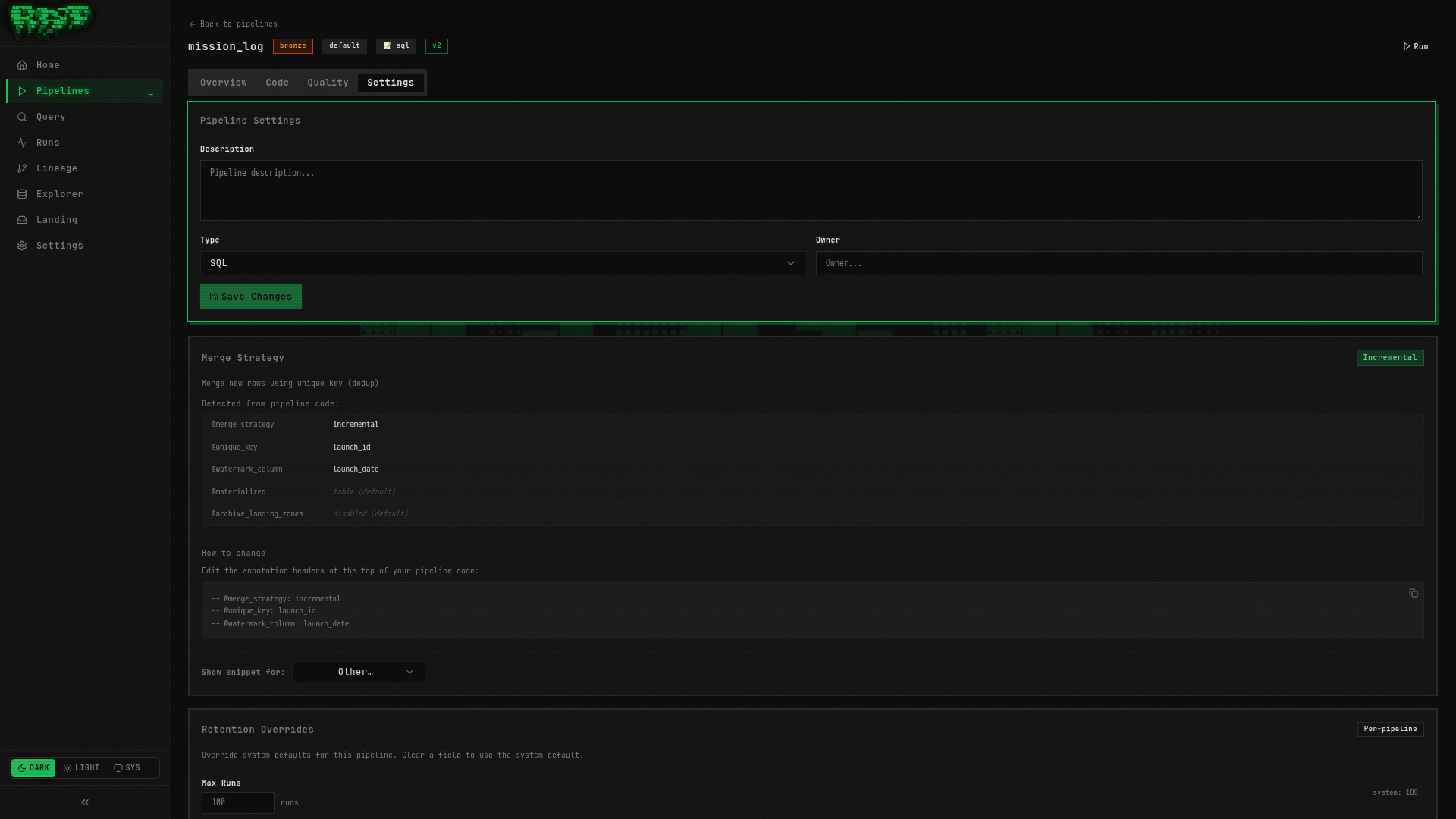
There are two ways to configure merge strategy settings in RAT:
Annotations live directly in your SQL file as comments:
-- @merge_strategy: incremental
-- @unique_key: launch_id
-- @watermark_column: launch_date

SELECT ...
Pros: Version-controlled with your SQL, visible at a glance, portable.
Config Merge Rules
When both annotations and config.yaml define the same field, annotations win. The merge logic is:
config.yamlis the base configuration- SQL annotations overlay per-field — each annotation overrides the corresponding config field
- If a field is set only in config.yaml, it’s used. If set only in annotations, it’s used. If set in both, the annotation takes precedence.
Most teams standardize on annotations for everything — it keeps the configuration co-located with the SQL, making code review easier. Use the Settings tab for quick experiments, then codify into annotations.
Jinja Helpers Reference
RAT provides several Jinja helpers for conditional logic in your SQL pipelines:
| Helper | Returns | Description |
|---|---|---|
is_incremental() | bool | True if the table already exists and strategy is incremental |
watermark_value | str | None | Max value of the watermark column from the existing table |
is_scd2() | bool | True if the merge strategy is scd2 |
is_snapshot() | bool | True if the merge strategy is snapshot |
is_append_only() | bool | True if the merge strategy is append_only |
is_delete_insert() | bool | True if the merge strategy is delete_insert |
ref('layer.name') | str | Resolves a pipeline reference to its Iceberg table path |
landing_zone('name') | str | Resolves a landing zone to its S3 path |
this | str | The current pipeline’s own Iceberg table path |
These helpers let you write a single SQL file that behaves differently depending on the pipeline’s state and configuration.
SCD2 Example (Reference)
For pipelines that need to track historical changes to dimension data — like a vehicle registry where specs might change over time — RAT supports Slowly Changing Dimension Type 2 (SCD2).
Here’s what an SCD2 pipeline would look like:
-- @merge_strategy: scd2
-- @unique_key: vehicle_name
-- @scd_valid_from: valid_from
-- @scd_valid_to: valid_to
-- @description: Vehicle specifications with full change history

SELECT
    vehicle_name,
    manufacturer,
    height_m,
    thrust_kn,
    stages,
    mass_kg,
    active
FROM read_csv_auto('{{ landing_zone("vehicle-catalog") }}')
When you run this pipeline:
- New rows (vehicle names not seen before) are inserted with
valid_from = now()andvalid_to = NULL - Changed rows (same vehicle name, different values) close the old record (
valid_to = now()) and insert a new one - Unchanged rows are left as-is
We won’t build this hands-on in this tutorial, but it’s good to know it’s available. SCD2 is essential for data warehouses that need audit-quality historical tracking.
What You Built
In this part, you:
- ✅ Learned all 6 merge strategies and when to use each
- ✅ Made
mission_logincremental with watermark-based loading - ✅ Understood annotations vs config.yaml and the merge rules
- ✅ Explored the full Jinja helpers reference
- ✅ Saw an SCD2 example for historical dimension tracking
Your mission_log pipeline now skips already-processed data on re-runs. In the next
part, you’ll add quality tests that catch bad data before it reaches downstream
pipelines.
Next: In Part 5, you’ll create quality tests that gate pipeline merges and prevent bad data from propagating.